
If a utility changes an account number, or the number in LeapAP does not match the one shown in the bill, rename the account in LeapAP. The account keeps its portal login and settings, so invoices continue to download automatically.
When to rename an account
- The utility has issued a new account number for the same service.
- The account number format is incorrect. The correct account number format on LeapAP might not be exactly as written on the invoice.
- If the account has moved to a different portal login, use Update Login instead. If the account has been closed, set its enrollment status to ACCOUNT-CLOSED.
Rename an account
Role needed: EditVendorClient
- Open the vendor page and go to its list of accounts.
- Click the edit icon next to the account number.
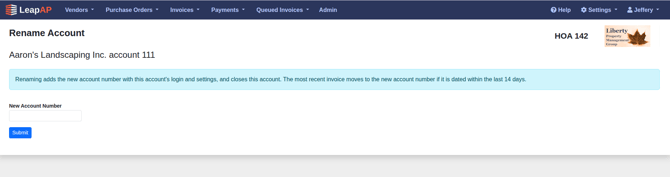
- Enter the new account number using letters and numbers only.
- Click Submit.
What happens when you rename
- The new account number is added and enrolled with the same portal login, PAP and default GL.
- The old account number is set to ACCOUNT-CLOSED.
- The most recent invoice moves to the new account number if it is dated within the last 14 days.
- You cannot rename to an account number that already exists for the vendor.