
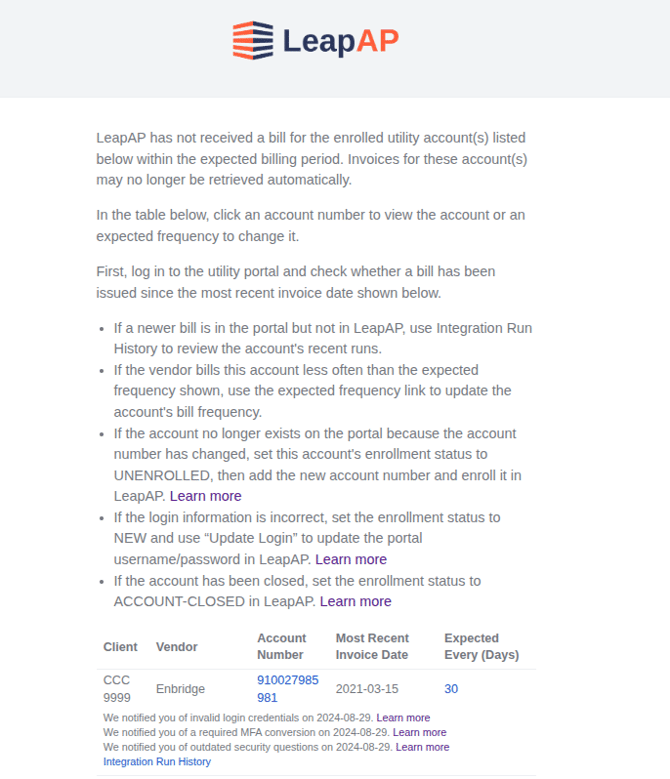
LeapAP expects each enrolled utility account to receive a bill on a regular cycle. If a bill does not arrive when expected, LeapAP can email you so you can check the utility portal before a payment is missed.
This feature is not enabled for clients by default.
How the bill frequency is set
Each account uses the first of these that is available:
- Account frequency: a frequency set on the account.
- Calculated frequency: determined from the account's recent bills.
- Vendor frequency: the usual billing frequency for that vendor.
- Default: 30 days.
How LeapAP calculates it
Each month, LeapAP reviews each account's recent bills and matches them to the closest standard billing cycle, such as monthly or quarterly. A user-set account-level frequency is never changed.
Change an account's bill frequency
Role needed: EditVendorClient
- Open the vendor and go to its list of accounts.
- Click the edit icon next to the account's bill frequency.
- Enter the number of days between bills and click Save.
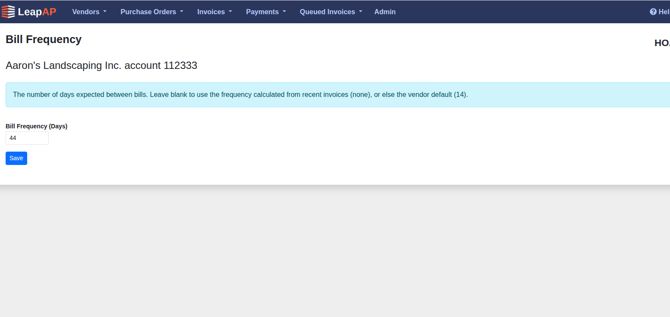
Leave the field blank to go back to the calculated or vendor frequency.
Turn on missing bill alerts
To turn on the missing bill alerts feature, please contact LeapAP support. All users with the EditIntegrationCredentials role will receive the notifications.
When you get an alert
An account is listed when its bill is more than 15 days past the expected date. Check the utility portal and then:
- If a new bill is in the portal, review the account's Integration Run History.
- If the vendor bills less often than shown, change the account's bill frequency.
- If the account number has changed, use Rename Account to change it to the new account number
- If the login is incorrect, set the enrollment status to NEW and use Update Login to update the portal username and password.
- If the account is closed, set its enrollment status to ACCOUNT-CLOSED.